Register with Oakley Medical Practice
Please use our online registration form to apply to join the practice. Select the button below to get started.
Register online with Oakley Medical Practice
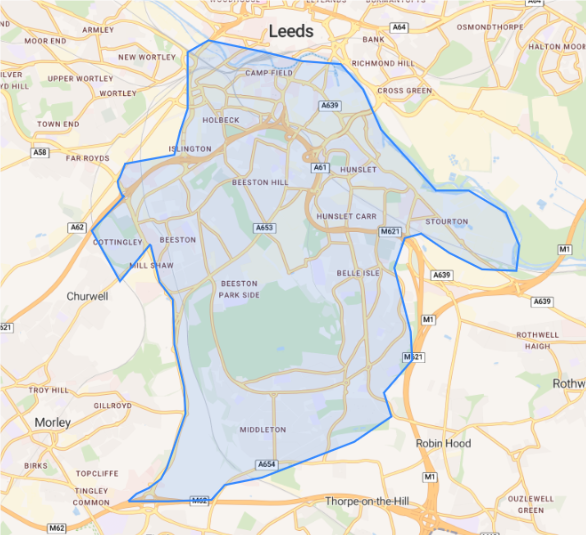
Check our practice boundary
The map at the bottom of the page shows the area covered by our practice.
Use the image as guidance to check whether your address is within our practice boundary. If you cannot use the map or are unsure whether your address is covered, please contact reception.
Before you start
Registration will be easier if you have your personal information ready.
You do not need proof of address, proof of immigration status, identification or an NHS number to register. If you know your NHS number, including it can help us find your medical records.
What you may be asked
The online form may ask for:
-
Your full name, date of birth and address
-
Your phone number or email address
-
The name and address of your current GP surgery, if you have one
-
Your NHS number, if known
-
Details of an emergency contact
-
Details of your carer, if you have one
-
Your medical history, allergies and current medication
Please complete a separate registration form for each person joining the practice, including children.
Other ways to register
If you cannot register online, do not have internet access or need help completing the form, call reception on 0113 272 0900 or visit the practice. Our team can help you with registration or provide a paper form.
Please tell us if you need an interpreter, information in another format or support with a disability or communication need.
After you apply
Our team will review your application and contact you if further information is needed. Submitting a form does not mean your registration is complete. Please wait for confirmation from the practice.